
Comparisons · 7 min read
Google Drive vs Givloh for Lead Magnets
A plain-English comparison for service businesses deciding whether to share free PDFs through Google Drive or use a lead capture system like Givloh.
- Google Drive is useful for storing and sharing files, but it is not a complete lead magnet system by itself.
- A lead magnet needs a page, an email gate, file delivery, lead storage, and simple reporting.
- Givloh is built for service businesses that want every PDF download to become a contactable lead.
The real difference
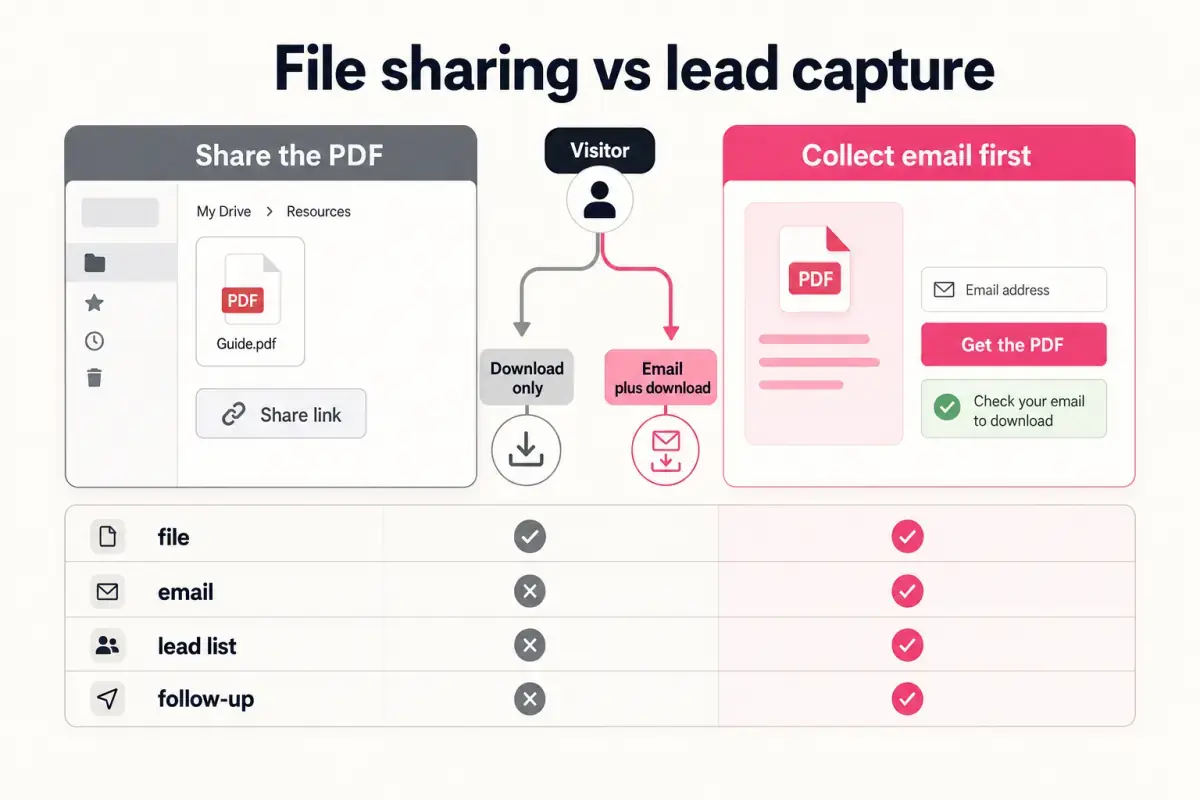
Google Drive is a file storage and sharing tool. It is excellent for keeping documents organized and sending files to people who already know they need access.
A lead magnet has a different job. It needs to persuade a social visitor to request a resource, collect their email, deliver the file, and save the lead somewhere the business can review.
That means the comparison is not really storage versus storage. It is file sharing versus lead capture.
Use the right tool for the job
- Use Google Drive to store and manage files.
- Use a lead capture page to turn downloads into contacts.
- Use a dashboard or lead list to prove which resources work.
Where Google Drive fits
Google Drive can work for simple sharing. If a client already asked for a document, sending a Drive link may be enough. It is familiar, flexible, and easy to use.
The problem starts when a service business posts a public Drive link as the main call to action. The visitor can download without leaving an email. The business may not know who downloaded, where they came from, or whether the resource produced a lead.
Permissions can also create friction. A file set to restricted blocks visitors. A file set to broad access may deliver the PDF, but it still does not create a follow-up list.
A Drive link can deliver the file. It cannot tell you who raised their hand.
Givloh editorial note
Where Givloh fits
Givloh fits when the resource is being used for acquisition. The service business uploads the guide, checklist, template, or tool, publishes one link, and captures the email before the download.
This is useful for the same kinds of resources that often end up in Drive: plumber checklists, accountant worksheets, mortgage broker guides, recruitment templates, and electrician safety PDFs. See the lead magnets hub for more examples.
The value is not that the PDF is stored somewhere else. The value is that the download becomes measurable and follow-up ready.
What a complete lead magnet system needs
- A focused resource page.
- A short email form.
- Automatic file delivery.
- A lead list or dashboard.
- A simple follow-up path.
Comparison table
| Need | Google Drive | Givloh |
|---|---|---|
| Store files | Strong fit | Supports uploaded resources |
| Share a private client file | Strong fit | Not the main job |
| Capture email before download | Requires another tool | Core workflow |
| Build a lead list from social visitors | Requires extra setup | Core workflow |
| Show which resource is working | Limited for lead capture | Built around lead visibility |
Which should you choose?
Choose Google Drive when you need file storage, internal organization, or simple sharing with people who already asked for access.
Choose Givloh when the file is meant to attract leads from Instagram, LinkedIn, Facebook, TikTok, or local search. If the business wants a follow-up list, the public link should not skip email capture.
Use this as the starting checklist
- Keep Google Drive for internal file storage.
- Use a lead capture page for public lead magnets.
- Do not post public PDF links if you need follow-up details.
- Make the email form short.
- Review lead count after each campaign.
References and useful next reading
Givloh
Turn the resource into a lead capture page.
Upload a guide, checklist, template, or tool. Share one link. Capture the email before the download. No Mailchimp, Zapier, Drive permissions, or landing page builder.
Try Givloh freeFAQ
Can I use Google Drive for a lead magnet?
You can use Google Drive to store the PDF, but a public Drive link by itself usually does not capture the visitor's email or create a lead list.
What does Givloh do that Google Drive does not?
Givloh creates a lead capture page, collects the email before download, delivers the file, and saves the lead for follow-up.
Should service businesses gate free PDFs?
If the PDF is being used for lead generation, yes. The email gate is what turns the download into a follow-up opportunity.