
Social lead generation · 7 min read
How to Deliver a Free PDF From Your Instagram Bio
A step-by-step guide for service businesses that want to offer a free PDF from Instagram and capture an email before delivery.
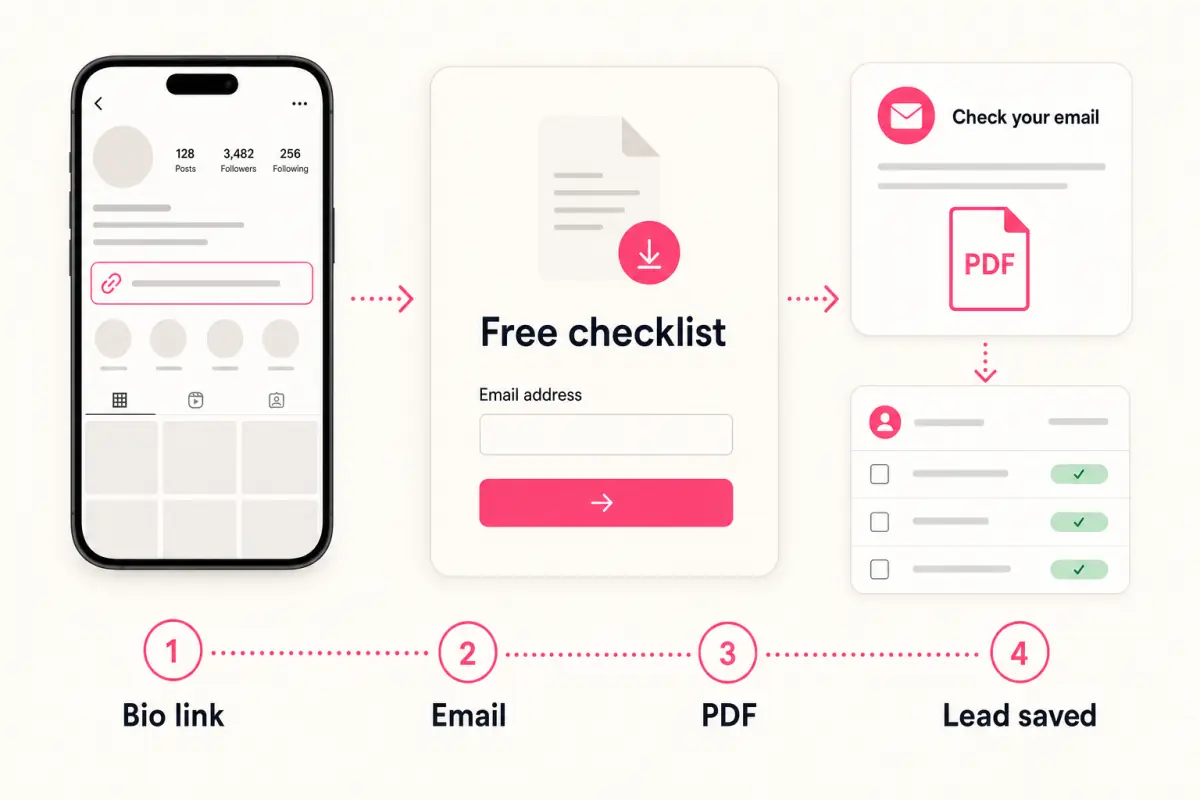
- The cleanest way to deliver a free PDF from Instagram is to put one resource page behind the bio link.
- The page should explain the PDF, ask for an email, deliver the file automatically, and save the lead.
- Do not send social visitors straight to a public file link if the goal is lead generation.
Start with one PDF
The first mistake is trying to offer too much. A service business does not need a full resource library to start. It needs one PDF that answers one customer question and makes the next conversation easier.
For a plumber, that might be an emergency warning signs checklist. For an accountant, it might be a record-keeping checklist. For a recruitment agency, it might be an interview scorecard. The format matters less than the promise.
If the PDF is useful enough to mention in a caption, it is probably useful enough to test behind the Instagram bio link.
Good first PDF formats
- Checklist.
- Preparation guide.
- Planning worksheet.
- Template.
- Mistake list.
Use the bio link as the delivery path
Instagram lets businesses add links to their profile. The important decision is where that link goes. If it goes straight to a public PDF, the visitor can download without becoming a lead.
A better path is a focused resource page. The page repeats the promise from the post, shows what is inside the PDF, asks for an email, and delivers the file automatically.
This is the same mechanism described in the social bio link lead generation guide: one resource, one form, one lead list.
The clean delivery flow
- Post about one customer problem.
- Point people to the link in bio.
- Send the link to a focused PDF page.
- Collect the email before delivery.
- Save the lead and follow up.
What the page should include
The page does not need to be long. It needs a clear title, a short explanation, a preview of what is inside, and a short email form. The visitor arrived from social, so the page should answer quickly: what is this, who is it for, and why should I enter my email?
The form should ask for as little as possible at first. An email address is enough for the first version. More fields can lower completion and make the resource feel like a sales trap.
After submission, the PDF should arrive immediately. A delayed or confusing delivery step weakens trust.
The PDF earns attention. The page turns that attention into permission.
Givloh editorial note
How to promote the PDF
Use posts that make the PDF feel like the natural next step. A Reel can explain one checklist item. A carousel can show the first three mistakes. A caption can tell people the full worksheet is available from the bio link.
Keep the call to action plain: 'I put the full checklist in a free PDF. Link in bio.' That is clearer than vague language like 'check out my links.'
Once the first PDF works, create more resources by profession or problem type. The lead magnets hub is the best place to compare examples.
Simple caption calls to action
- Grab the free checklist from the link in my bio.
- I made the full worksheet free to download.
- Use the guide before you book a quote.
- Download the template and reply with any questions.
What to avoid
Avoid posting a raw file link if the goal is lead capture. Avoid asking for too many fields. Avoid hiding the PDF behind a confusing menu of unrelated buttons.
Also avoid making the resource sound bigger than it is. A useful one-page checklist is better than a vague ebook that nobody finishes.
The best first test is simple: can someone tap from Instagram, understand the PDF, enter an email, and receive the file without needing help?
Use this as the starting checklist
- Choose one PDF for one customer problem.
- Add a direct bio link to the PDF landing page.
- Ask only for email on the first version.
- Deliver the file automatically.
- Follow up based on the specific PDF they downloaded.
References and useful next reading
Givloh
Turn the resource into a lead capture page.
Upload a guide, checklist, template, or tool. Share one link. Capture the email before the download. No Mailchimp, Zapier, Drive permissions, or landing page builder.
Try Givloh freeFAQ
Can I deliver a PDF from my Instagram bio?
Yes. The best setup is to link your bio to a focused resource page that captures an email and delivers the PDF automatically.
Should I link directly to a PDF from Instagram?
Only if you do not need lead capture. If the goal is to build a list, use an email-gated resource page instead.
What should the PDF be about?
Choose one question your customers already ask and turn the answer into a short checklist, guide, worksheet, or template.