
Platform strategy · 8 min read
Google Business Profile Free Guide Strategy for Local Service Businesses
How local service businesses can use Google Business Profile updates to promote free resources and capture leads from people already checking them out.
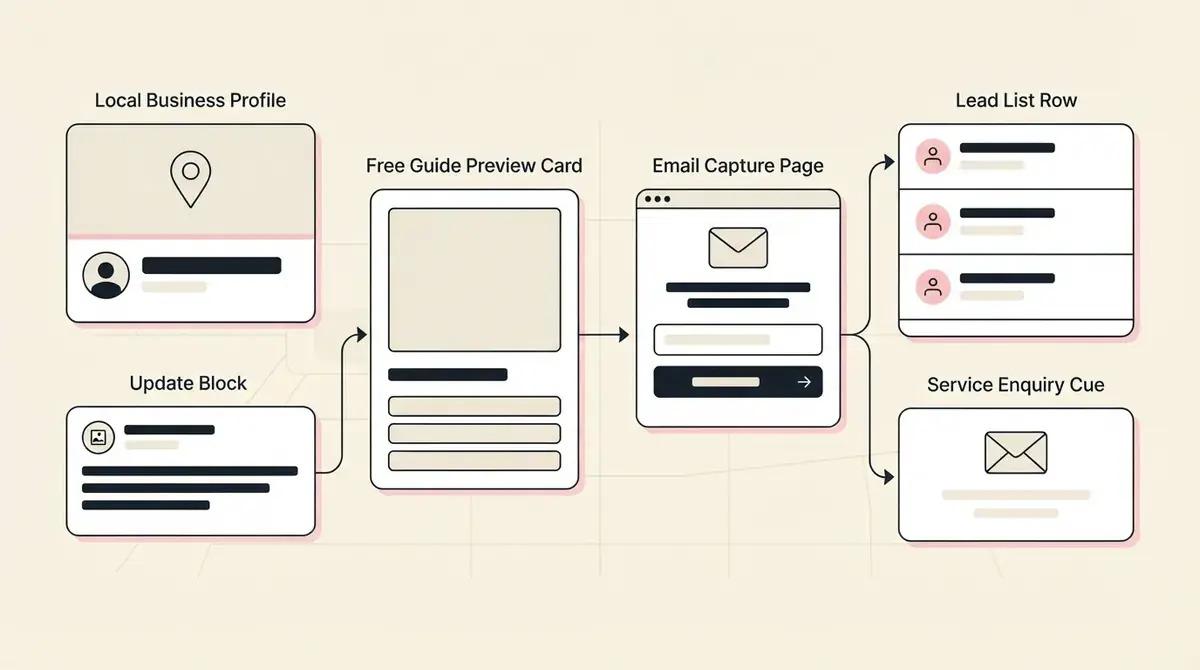
- Google Business Profile can support lead capture when updates point people to a useful resource instead of only listing contact details.
- The resource should match local intent: preparation checklists, quote guides, inspection questions, or service-readiness worksheets.
- A Givloh link gives the business a simple way to turn profile attention into email leads.
Treat profile visitors as warm prospects
Someone looking at a local service business on Google is often closer to taking action than a casual social follower. They may be comparing providers, checking opening hours, reading reviews, or deciding whether to call.
That makes a useful free resource a strong next step. It gives the visitor something practical before they are ready to enquire, while still giving the business a named lead to follow up with.
The resource should be local and service-specific, not a generic company brochure.
Good Google Business Profile resource angles
- A pre-quote checklist.
- A what-to-ask-before-you-book guide.
- A maintenance warning-sign checklist.
- A preparation worksheet for the first appointment.
- A local service comparison checklist.
Use updates to point to one useful link
Business Profile updates can keep customers informed about services, offers, and business information. For lead generation, the update should focus on a practical reason to click.
A roofer might post a seasonal roof check checklist. A cleaner might post an end-of-tenancy handover checklist. A consultant might post a pre-consultation worksheet.
The link should lead to one email-gated resource page, not a messy folder or a long list of unrelated links.
Simple update structure
- Name the local problem or upcoming decision.
- Explain what the free resource helps the reader check or prepare.
- Keep the copy short and practical.
- Link to the Givloh resource page.
- Follow up with the service next step after download.
Match the resource to search intent
People do not usually visit a Google Business Profile for entertainment. They want confidence, proof, contact details, or clarity before making an enquiry.
A good resource should help with that decision. It might help them understand whether they need the service, what information to gather, or what to ask before booking.
If the resource helps the buyer move one step closer to a serious conversation, it belongs in the profile strategy.
For local service businesses, a profile visitor is not just traffic. It is often a person deciding whether to trust you.
Givloh editorial note
Keep the follow-up simple
A download from a Google Business Profile update should be followed up with direct context. Mention the resource, add one useful note, and offer the next relevant action.
For example, if someone downloads a quote checklist, the business can ask whether they want help reviewing the checklist or preparing a quote request.
This keeps the interaction practical instead of turning a warm local lead into a generic mailing-list contact.
Next-step examples
- Ask if they want help choosing the right service.
- Invite them to send photos or details for a quote.
- Offer a short consultation or inspection.
- Point them to the correct appointment type.
- Answer one common question from the checklist.
Use this as the starting checklist
- Choose one local service question the resource answers.
- Use a short Google Business Profile update to promote it.
- Send visitors to one email-gated resource page.
- Avoid broad company brochures or generic PDFs.
- Follow up with the next local service action.
References and useful next reading
Givloh
Turn the resource into a lead capture page.
Upload a guide, checklist, template, or tool. Share one link. Capture the email before the download. No Mailchimp, Zapier, Drive permissions, or landing page builder.
Try Givloh freeFAQ
Can Google Business Profile help capture leads?
Yes. Profile visitors are often already considering the business. A useful linked resource can capture people who are interested but not ready to call yet.
What kind of free guide works best from Google Business Profile?
Local, practical resources work best: quote checklists, appointment prep sheets, warning-sign lists, and service comparison guides.
Should a business link to a PDF directly from its profile?
A direct file link may be simple, but it does not capture a lead. An email-gated resource page gives the visitor the file and gives the business a contact to follow up with.