
Platform tactics · 7 min read
Google Business Profile Lead Generation for Local Service Businesses
A practical guide to using Google Business Profile updates, website links, and free resources to capture email leads from local service enquiries.
- Google Business Profile can support lead generation when the profile points people to a useful resource, not only a homepage or phone number.
- Local service businesses can share practical checklists, preparation guides, and buyer guides through profile updates and website links.
- The resource page should capture the email before delivery so local search interest becomes an owned lead.
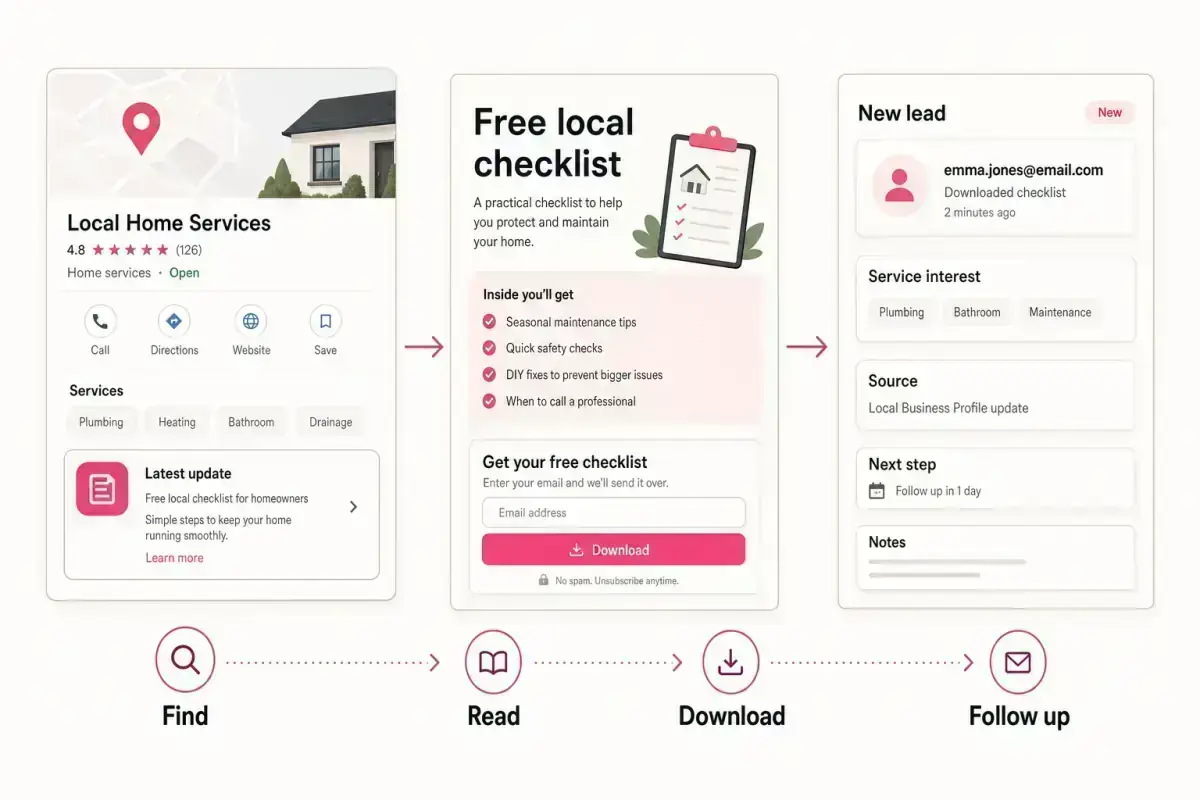
The profile is not the whole funnel
Google Business Profile helps a local business show up with key details such as services, contact options, reviews, photos, and updates. That visibility matters, but it does not automatically create an email lead list.
A local visitor may not be ready to call. They may still be checking symptoms, comparing options, planning a project, or deciding whether the problem is urgent. A useful free resource gives that person a lower-pressure next step.
For example, a roofer can offer a roof maintenance checklist, an estate agent can offer a valuation prep checklist, and a bookkeeper can offer a month-end records checklist. The lead magnets library covers more examples.
The profile should point to a next step that is
- Useful before someone is ready to book.
- Specific to the service problem.
- Simple to explain in a short update.
- Delivered automatically after email capture.
- Connected to a clear follow-up.
Use updates to explain the resource
Google says Business Profile posts can be used to share updates, offers, announcements, and events with customers on Search and Maps. A service business can use that space to explain a useful resource in plain language.
The update should not be a generic promotion. It should name the problem and the resource: "Not sure if your roof needs attention after heavy rain? Download our free 10-point roof check before you book an inspection."
That kind of wording works because it helps the visitor decide what to do next. It also gives the business a measurable action beyond profile views.
Simple update structure
- Name the local problem.
- Mention the free resource.
- Explain who should download it.
- Link to the resource page.
- Follow up with anyone who requests it.
Choose resources that fit local intent
Local search intent is often practical. People want to know whether a problem is urgent, what a service involves, what to prepare, or what questions to ask before booking.
Good resources include maintenance checklists, appointment preparation guides, first-visit worksheets, seasonal safety lists, quote preparation sheets, and buyer guides. Avoid broad ebooks that feel disconnected from the service decision.
If the business already gets repeated phone questions, start there. The best resource is usually the answer the owner gives every week.
A local lead magnet should make the next phone call easier, not add another marketing task.
Givloh editorial note
Capture and follow up carefully
A profile visitor who downloads a checklist is not the same as a booked customer, but they are more useful than an anonymous click. The download tells the business what problem the person is thinking about.
The follow-up should stay relevant. If someone downloads a boiler checklist, ask whether they want to send a photo or describe the issue. If someone downloads a valuation prep checklist, ask whether they are planning to sell soon or simply want a baseline.
Givloh gives local businesses the resource page, email capture, file delivery, and lead dashboard in one place, so the Google Business Profile link leads to a real lead capture system instead of another static page.
Track the useful signals
- Which profile update sent the visitor.
- Which resource they downloaded.
- What service category the resource belongs to.
- Whether they replied to the follow-up.
- Which resources turn into booked enquiries.
Use this as the starting checklist
- Pick one local service problem.
- Create a checklist or preparation guide around that problem.
- Use a Business Profile update to explain the resource.
- Send the click to an email-gated resource page.
- Follow up based on the exact resource requested.
References and useful next reading
Givloh
Turn the resource into a lead capture page.
Upload a guide, checklist, template, or tool. Share one link. Capture the email before the download. No Mailchimp, Zapier, Drive permissions, or landing page builder.
Try Givloh freeFAQ
Can Google Business Profile generate email leads?
Yes, if the profile sends interested visitors to a useful resource page that captures an email before delivering the checklist, guide, worksheet, or template.
What should a local service business link to from its profile?
In addition to core booking or website links, it can link to a helpful resource such as a maintenance checklist, quote prep guide, buyer guide, or appointment preparation sheet.
Should the resource replace the phone number?
No. Keep direct contact options available. The resource is for visitors who are interested but not ready to call yet.