
Comparisons · 7 min read
Zapier vs Givloh for Lead Magnet Delivery
A plain-English comparison for service businesses deciding whether to automate lead magnet delivery with Zapier or use one focused Givloh link.
- Zapier is useful when a business needs to connect several tools it already understands.
- Givloh is simpler when the job is specifically to host a resource, capture an email, deliver the file, and show the lead.
- For a small service business starting from scratch, fewer moving parts usually matters more than automation flexibility.
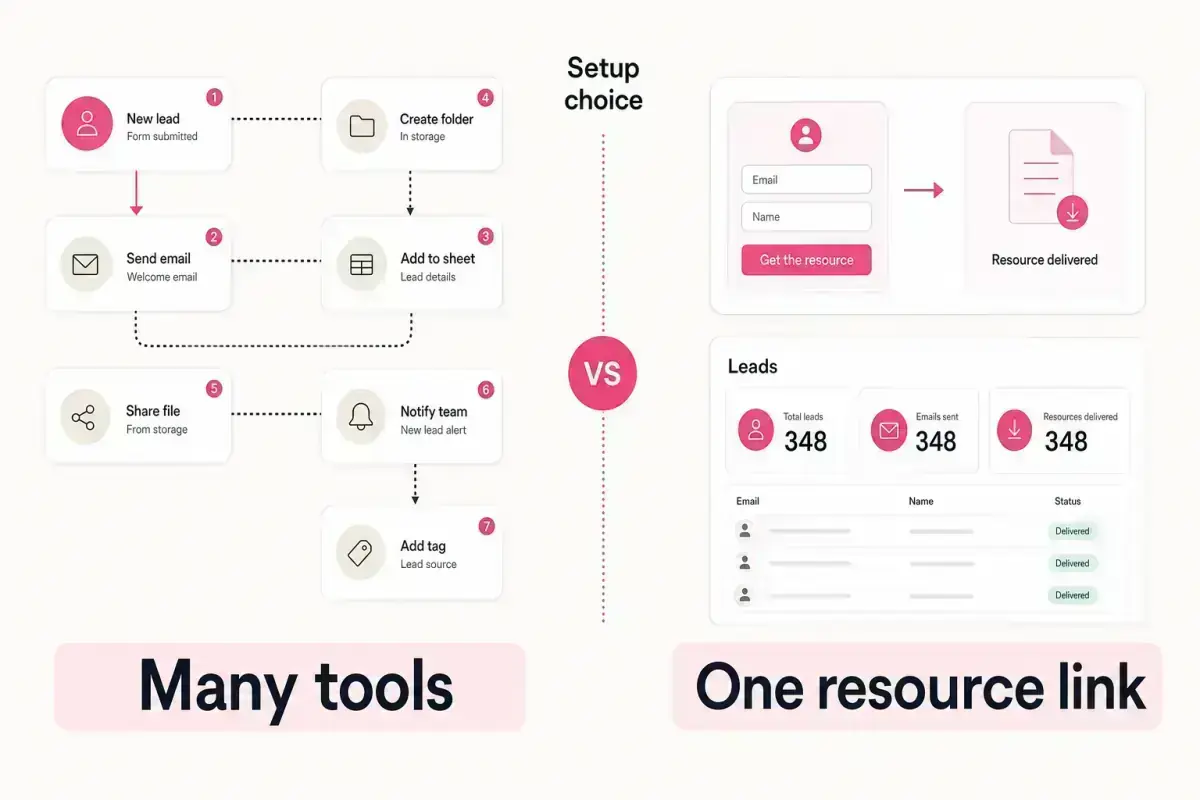
The practical difference
Zapier is an automation platform. It can connect apps and move data between them. That flexibility is useful when a business already has a landing page, form, email tool, file host, and a clear process for what should happen next.
Givloh is narrower. It is built for one job: a service business uploads a resource, shares a link, captures an email, delivers the file, and sees the lead in a dashboard.
The question is not which tool is more powerful. The question is which setup a busy service business owner will actually finish.
Use the right frame
- Zapier connects tools.
- Givloh replaces the need to connect several tools for this specific workflow.
- Zapier is flexible when the workflow is already designed.
- Givloh is faster when the workflow is simply lead magnet delivery.
Where Zapier fits
Zapier can make sense when a business already uses a mature stack and wants to automate extra steps. For example, a firm might send form submissions into a CRM, add tags in an email platform, create a task for a sales rep, or notify a team channel.
That is useful, but it assumes the business has already chosen and configured the other tools. The landing page still needs to exist. The file still needs hosting. The email capture form still needs to work. The business still needs to know where the lead goes.
For many small service businesses, the hard part is not the automation step. It is getting the first working resource page live.
A typical Zapier-style setup may require
- A landing page or form tool.
- A file hosting location.
- An email or CRM destination.
- An automation connecting the tools.
- Testing each handoff before sharing the link.
Where Givloh fits
Givloh fits when the business wants the simplest working version. Upload the guide, checklist, template, or tool. Publish the resource page. Share one link. Capture the email before delivery.
That is enough for the first social lead generation test. A plumber, accountant, personal trainer, estate agent, or recruitment agency does not need a complex automation map to prove whether a resource gets downloads.
If the business later needs deeper CRM routing, it can make that decision with real lead data. The first win is getting the system live.
Automation is useful after the lead capture loop exists. It should not be the reason the loop never launches.
Givloh editorial note
Side-by-side comparison
| Need | Zapier | Givloh |
|---|---|---|
| Host the resource | Needs another tool | Built for the resource page |
| Capture the email | Needs a form or email tool | Built into the flow |
| Deliver the file | Connects tools to deliver it | Handles delivery directly |
| Show the lead | Depends on destination tool | Shows leads in the dashboard |
| Best for | Custom multi-app workflows | Service business lead magnets |
Decision rule
- Choose Zapier if you already have the stack and need custom routing.
- Choose Givloh if you want one link that captures and delivers the resource.
- Do not start with a complex automation if a single resource page has not been tested.
How to decide
If the business already uses a CRM and email platform every day, Zapier may be part of the long-term system. If the business is still sending Google Drive links and hoping people remember to enquire, Givloh is the more direct starting point.
The Google Drive vs Givloh comparison covers the file-hosting version of this decision. This page covers the automation version.
Use this as the starting checklist
- List the tools you would need before choosing Zapier.
- Check whether you already have a working landing page and form.
- Use Givloh if the main job is resource hosting, email capture, delivery, and lead visibility.
- Avoid building automation before proving the resource gets downloads.
- Review costs and maintenance time, not just feature lists.
References and useful next reading
Givloh
Turn the resource into a lead capture page.
Upload a guide, checklist, template, or tool. Share one link. Capture the email before the download. No Mailchimp, Zapier, Drive permissions, or landing page builder.
Try Givloh freeFAQ
Is Zapier better than Givloh for lead magnets?
Zapier is better for custom multi-app automation. Givloh is better when a service business wants one focused system for hosting a resource, capturing the email, delivering the file, and seeing the lead.
Can Zapier deliver a lead magnet?
Yes, but it usually needs other tools around it, such as a form, landing page, file host, and email or CRM destination.
Why would a service business choose Givloh instead?
Because the lead magnet workflow is already bundled: upload the resource, share the link, capture the email, deliver the file, and view the lead.