
Social lead generation · 7 min read
How to Turn a Checklist Into a Lead Capture Page
A practical guide for service businesses that already have a useful checklist and want to turn it into a simple email-gated lead capture page.
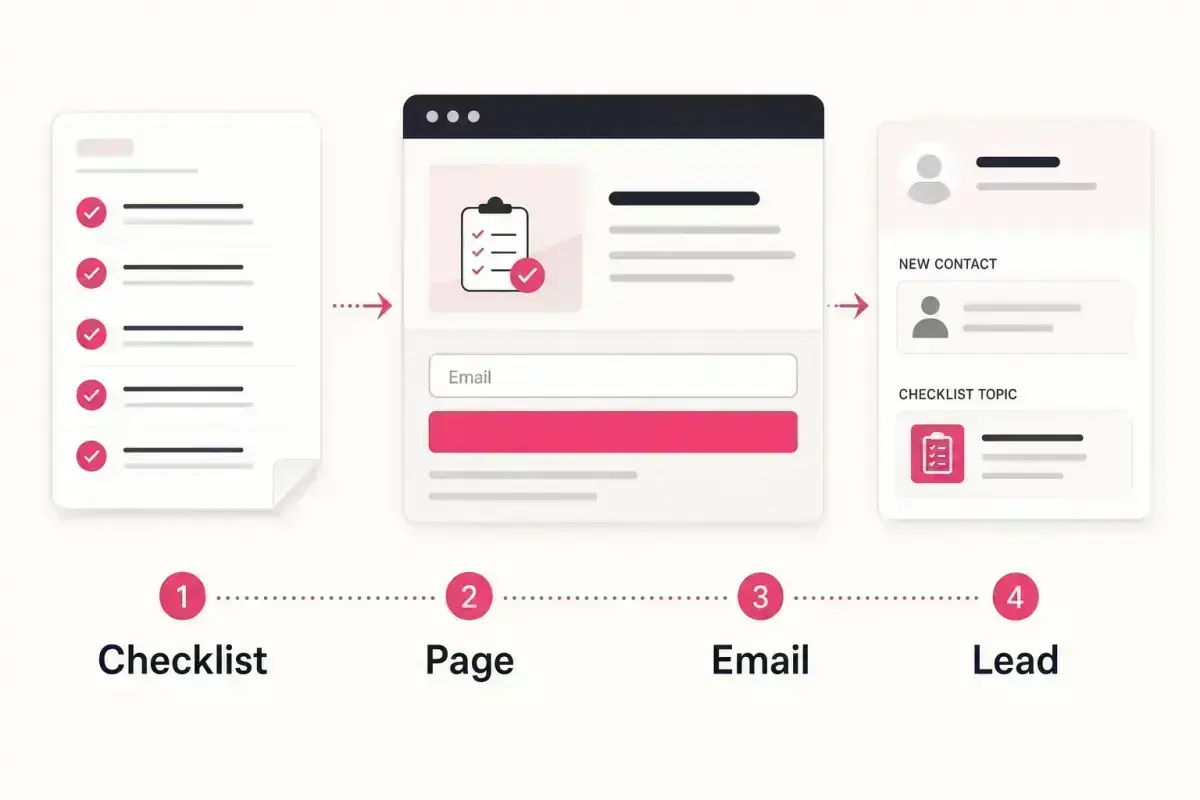
- A checklist becomes a lead capture page when it has a clear promise, a short page, an email gate, automatic delivery, and a follow-up plan.
- The page should explain the problem the checklist solves, who it is for, and what the visitor gets after entering an email.
- Keep the first version simple. One useful checklist that captures leads is better than a polished resource that never launches.
Start with the checklist promise
A checklist does not need a long landing page. It needs a clear promise. The visitor should understand who the checklist is for, what problem it helps with, and why it is worth exchanging an email for.
A weak promise sounds like "download our free guide." A stronger promise sounds like "get the 10-point checklist homeowners can use before booking a roof inspection." The second version names the audience, the task, and the moment.
If the checklist is still too broad, narrow it before building the page. For examples by industry, browse the lead magnets section.
A strong checklist promise includes
- The audience: homeowner, landlord, business owner, buyer, patient, client.
- The problem or decision they are facing.
- The practical output they will get.
- A reason to use it now.
- A natural next step after download.
Write the page in five blocks
The page should be short enough for a social visitor to scan. Start with a headline, then a short explanation of the problem, three to five bullets showing what is inside, the email form, and one trust-building note about what happens after download.
Do not over-explain the business. The visitor is not reading a brochure. They are deciding whether the checklist is worth requesting.
The best page copy feels like a helpful answer to a question the visitor already had.
Page structure
- Headline: say what the checklist helps with.
- Intro: explain the problem in two or three sentences.
- Bullets: show what the checklist includes.
- Form: ask for the email only at first.
- After-download note: explain the practical next step.
Connect delivery to follow-up
Lead capture does not end when the file is delivered. The download tells the business what the person cares about. Use that context in the first follow-up.
If someone downloads a plumber emergency checklist, ask whether they spotted one of the warning signs. If someone downloads a bookkeeping checklist, ask whether they are setting up a routine or cleaning up old records. If someone downloads a solicitor prep sheet, offer the right consultation next step.
That is why a checklist page is stronger than a plain file link. The business does not just deliver information. It starts a relevant conversation.
The email gate is useful only if the follow-up respects the reason the person downloaded the checklist.
Givloh editorial note
Share one focused link
Once the page is ready, share the same link from the social bio, relevant posts, email signature, Google Business Profile, and direct replies where it genuinely helps. Do not bury it inside a menu of unrelated links.
The point is focus. A service business should be able to say: "If this problem is on your mind, grab the checklist here."
For the Instagram-specific version of this workflow, read how to deliver a free PDF from your Instagram bio.
Before sharing, check that
- The title says who the checklist is for.
- The email form is short.
- The file delivers automatically.
- The lead appears somewhere the owner can see.
- The follow-up references the downloaded checklist.
How Givloh fits
Givloh handles the mechanics: hosted page, email gate, file delivery, and lead dashboard. The business brings the checklist and the follow-up idea.
That means a useful PDF sitting on the desktop can become a live lead capture page without setting up Google Drive permissions, Mailchimp forms, Zapier automations, or a separate landing page builder.
Use this as the starting checklist
- Tighten the checklist promise.
- Write a short page around the problem it solves.
- Ask for the email before delivery.
- Deliver the file automatically.
- Follow up based on the checklist topic.
References and useful next reading
Givloh
Turn the resource into a lead capture page.
Upload a guide, checklist, template, or tool. Share one link. Capture the email before the download. No Mailchimp, Zapier, Drive permissions, or landing page builder.
Try Givloh freeFAQ
How do you turn a checklist into a lead magnet?
Give the checklist a clear promise, publish it on a focused page, ask for an email before download, deliver the file automatically, and follow up based on the topic.
How long should a checklist lead capture page be?
It can be short. A clear headline, problem explanation, checklist bullets, email form, and next-step note are enough for a first version.
Should the checklist be free?
For service businesses, a free checklist is often useful because the business is not selling the PDF. It is starting a qualified service conversation.