
Local lead generation · 8 min read
How to Turn a Service Area Guide Into a Lead Magnet
A practical guide for local service businesses that want to turn service-area advice into an email-gated resource without creating thin location pages.
- A service area guide should help people understand whether the business can help in their location and what to prepare before enquiring.
- The strongest version is not a thin location page. It is a useful local resource, checklist, or planning guide gated behind an email.
- Givloh lets the business share one guide link from Google Business Profile, social profiles, QR codes, and email signatures, then see which readers became leads.
Start with a real local decision
A service area guide works when it answers a practical local question. A homeowner may want to know whether a roofer covers their town. A landlord may need a cleaner that serves several nearby postcodes. A family may be comparing care, tutoring, inspection, or maintenance options across a small region.
The guide should help the reader decide whether the business is relevant before they call. That means naming the area clearly, explaining what changes by location, and showing what information the business needs before giving a useful answer.
Avoid creating a page that only repeats a place name and a service name. That kind of page gives the reader very little. A better resource explains routes, access, property types, booking windows, site-visit preparation, local constraints, or common questions in that area.
Useful service area guide angles
- What to prepare before booking a site visit in a specific area.
- How local property type, access, timing, or parking affects the job.
- A checklist for comparing providers across nearby towns.
- A guide to common service questions in a defined region.
- A simple map-free explanation of the areas the business can realistically serve.
Keep it helpful instead of over-optimized
Search visibility is useful, but the page still has to earn the email. A service area guide should be written for someone deciding whether to enquire, not for a search engine scanning repeated keywords.
Google Business Profile guidance asks service-area businesses to describe their service area accurately. The same principle is useful for a lead magnet: be specific about where the business works, but do not pretend to serve places it cannot reach properly.
If the business serves multiple areas, one strong guide can explain how coverage works and then invite the reader to request the full checklist, quote-prep sheet, or area-specific planner.
A service area guide should prove local usefulness before it asks for contact details.
Givloh editorial note
Turn the guide into a lead capture path
The public page should explain the problem and preview the value. The downloadable resource should carry the practical detail: preparation checklist, area questions, booking notes, measurement sheet, maintenance planner, or buyer guide.
For example, a cleaning business might offer a 'move-out cleaning checklist for landlords in North London'. A surveyor might offer a 'home survey preparation guide for buyers in Surrey'. A landscaper might offer a 'garden consultation prep checklist for homeowners in nearby villages'.
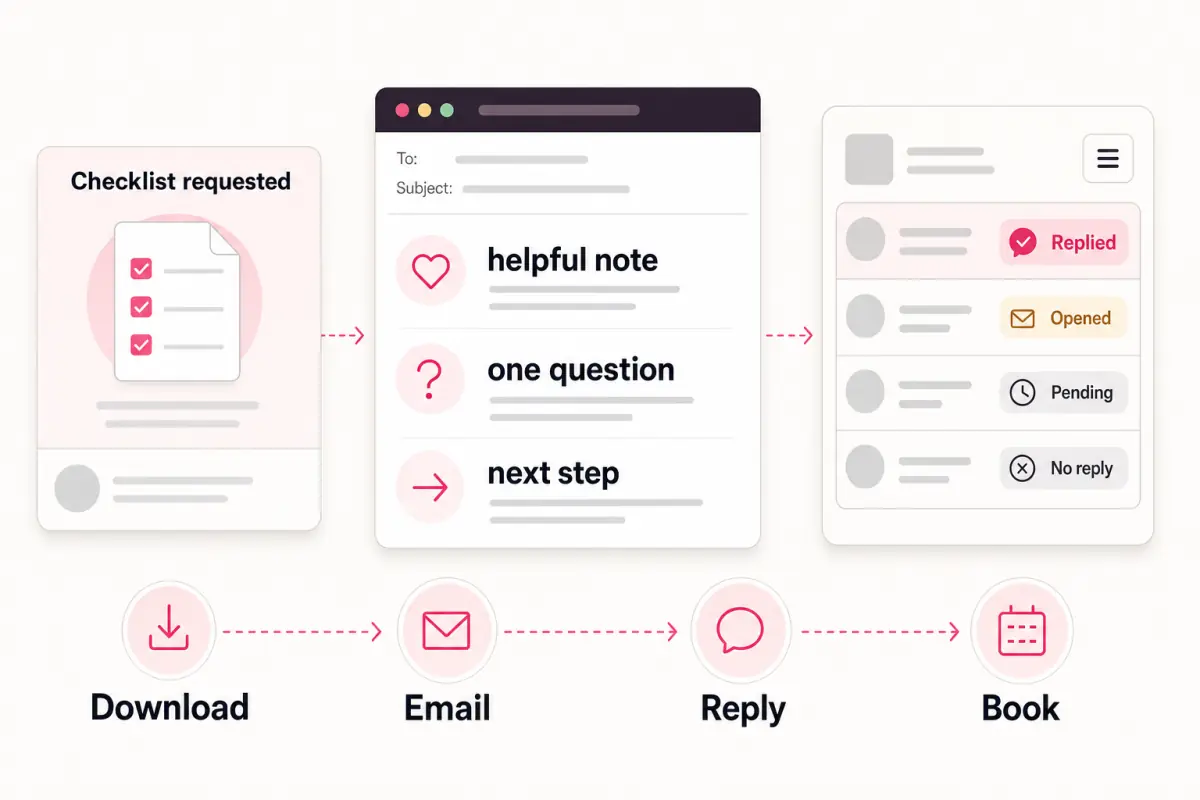
Givloh gives the business one email-gated page for that resource, so a social visitor or Google Business Profile reader can request the guide without the owner wiring together file hosting, forms, and email delivery.
Simple service area guide workflow
- Choose one area or cluster of nearby areas the business genuinely serves.
- Pick one useful resource format: checklist, guide, planner, worksheet, or question sheet.
- Write the public page around the local decision the reader is making.
- Upload the file to Givloh and gate it behind a short email form.
- Share the link from Google Business Profile, social profiles, referral emails, and printed material.
Follow up with location context
A service area guide gives the business a useful reason to follow up. The first reply can ask where the reader is based, what property or project type they have, and what timing they are working toward.
Keep the follow-up practical. Do not send the same generic sales message to every download. Mention the resource they requested and ask for the one detail needed to give better help.
For a related local resource angle, read how to turn a local buyer's guide into a lead magnet.
Useful follow-up fields
- Town, postcode area, neighborhood, or service area.
- Property type, project type, or service need.
- Urgency: planning, comparing, ready to book, or emergency.
- Access notes, visit constraints, or preferred appointment window.
- Resource downloaded and channel where the reader found it.
Use this as the starting checklist
- Choose a real service area the business can support confidently.
- Write around the reader's local decision, not a repeated keyword pattern.
- Put the detailed checklist, planner, guide, or worksheet behind email capture.
- Share one Givloh link from Google Business Profile, social, QR, referral, and email channels.
- Follow up using location, property type, timing, and resource downloaded.
References and useful next reading
Givloh
Turn the resource into a lead capture page.
Upload a guide, checklist, template, or tool. Share one link. Capture the email before the download. No Mailchimp, Zapier, Drive permissions, or landing page builder.
Try Givloh freeFAQ
What is a service area guide lead magnet?
It is a local guide, checklist, worksheet, or planner that helps a potential customer understand whether a service business can help in their area and what to prepare before enquiring.
Should every town get its own lead magnet page?
Not by default. Start with one genuinely useful area guide or a small cluster of nearby areas. Avoid thin pages that only swap location names.
Where should a service business share a service area guide?
Useful channels include Google Business Profile updates, Instagram or Facebook bios, LinkedIn posts, local referral emails, QR codes, printed quotes, and email signatures.