
WhatsApp lead generation · 8 min read
WhatsApp Lead Magnet Strategy for Local Service Businesses
How local service businesses can use WhatsApp alongside an email-gated lead magnet without turning every enquiry into a scattered chat thread.
- WhatsApp is useful for conversations, but it should not be the only place a service business captures demand.
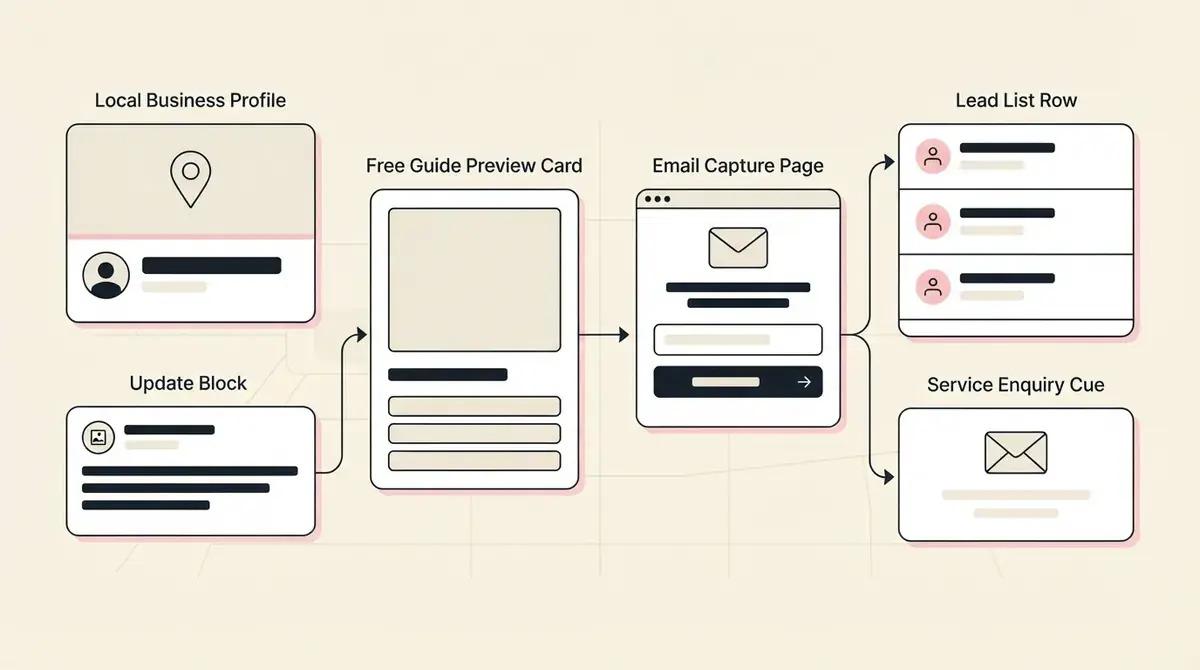
- A stronger setup sends interested people to one lead magnet page first, captures the email, delivers the resource, and then uses WhatsApp for follow-up where appropriate.
- Givloh gives the business one resource link to share in WhatsApp replies, profile details, QR codes, social posts, and local campaigns.
Use WhatsApp for conversation, not file chaos
WhatsApp is often where local service enquiries actually happen. A homeowner sends a photo. A client asks about availability. A referral partner forwards a number. That immediacy is useful.
The problem is that chats become scattered quickly. If every free guide, checklist, and price explainer is sent manually as an attachment, the business gets no clean lead source, no resource analytics, and no reliable list to follow up later.
A lead magnet link fixes the first step. The business can reply with one helpful resource, capture the email through Givloh, and then continue the conversation in WhatsApp if that is the right channel.
Use this setup when
- Prospects already ask questions through WhatsApp.
- The business sends the same explanation repeatedly.
- The team wants to capture emails before sending guides or checklists.
- A QR code or printed card should lead to a useful resource.
- Follow-up needs to happen outside a single chat thread.
Choose the right first resource
The best WhatsApp resource is the thing the business already explains in chat. That may be a pre-visit checklist, quote request guide, maintenance planner, buyer guide, or consultation prep sheet.
For example, a cleaner can share an end-of-tenancy checklist, a mechanic can share a warning-signs guide, and a hair salon can share a consultation prep checklist.
If the resource is mainly for local social traffic, compare the broader Facebook lead generation guide for local service businesses.
Do not make WhatsApp do the job of a lead database. Let it handle the conversation after the lead is captured.
Givloh editorial note
Put the link in the right places
A WhatsApp lead magnet link can sit in quick replies, saved message templates, profile details, QR codes, printed leave-behinds, invoice footers, local partner messages, and social captions.
The call to action should be plain. 'Grab the prep checklist here' is usually stronger than a long promotional message.
If the business uses WhatsApp Business, it can still keep the resource delivery in Givloh so every download creates a trackable lead.
Simple WhatsApp workflow
- Identify one repeated question in WhatsApp enquiries.
- Turn the answer into a short guide or checklist.
- Upload the resource to Givloh and publish the email-gated page.
- Save the Givloh link as a WhatsApp quick reply or reusable message.
- Follow up in WhatsApp or email based on the lead's context.
Keep consent and expectations clean
A person who downloads a guide should understand what happens next. The page should say what they are requesting, and the business should avoid adding people to unrelated messages without permission.
For many service businesses, the simplest approach is to capture the email for the resource, then ask a clear follow-up question if a WhatsApp conversation continues.
For another way to use offline and local touchpoints, see how to use QR codes with service business lead magnets.
Good WhatsApp follow-up questions
- Would you like help choosing the right option?
- Do you want to send photos before we quote?
- Which date or deadline are you working toward?
- Is this for your home, business, rental, or client site?
- Would you like a call, message reply, or email follow-up?
Use this as the starting checklist
- Turn one repeated WhatsApp answer into a short resource.
- Publish it through Givloh with email capture and automatic delivery.
- Use the Givloh link in WhatsApp quick replies, QR codes, profiles, and social posts.
- Keep WhatsApp for conversation after the resource request.
- Follow up with clear consent and a specific next question.
References and useful next reading
Givloh
Turn the resource into a lead capture page.
Upload a guide, checklist, template, or tool. Share one link. Capture the email before the download. No Mailchimp, Zapier, Drive permissions, or landing page builder.
Try Givloh freeFAQ
Can WhatsApp be used for lead generation?
Yes, but it works better when paired with a lead capture page. WhatsApp can handle conversation, while Givloh captures the email and delivers the resource.
Should a service business send lead magnets as WhatsApp attachments?
Usually not as the main workflow. Attachments are hard to track and do not build a clean lead list. A Givloh link is more reliable for capture and delivery.
Where can a WhatsApp lead magnet link be shared?
Use it in quick replies, profile details, QR codes, printed cards, social captions, referral messages, email signatures, and local campaigns.