
Lead capture comparisons · 8 min read
Zoho Forms vs Givloh for Lead Magnets
A plain-English comparison for service businesses choosing between a general form builder and a dedicated lead magnet delivery page.
- Zoho Forms is a broad online form builder for collecting structured data across many business processes.
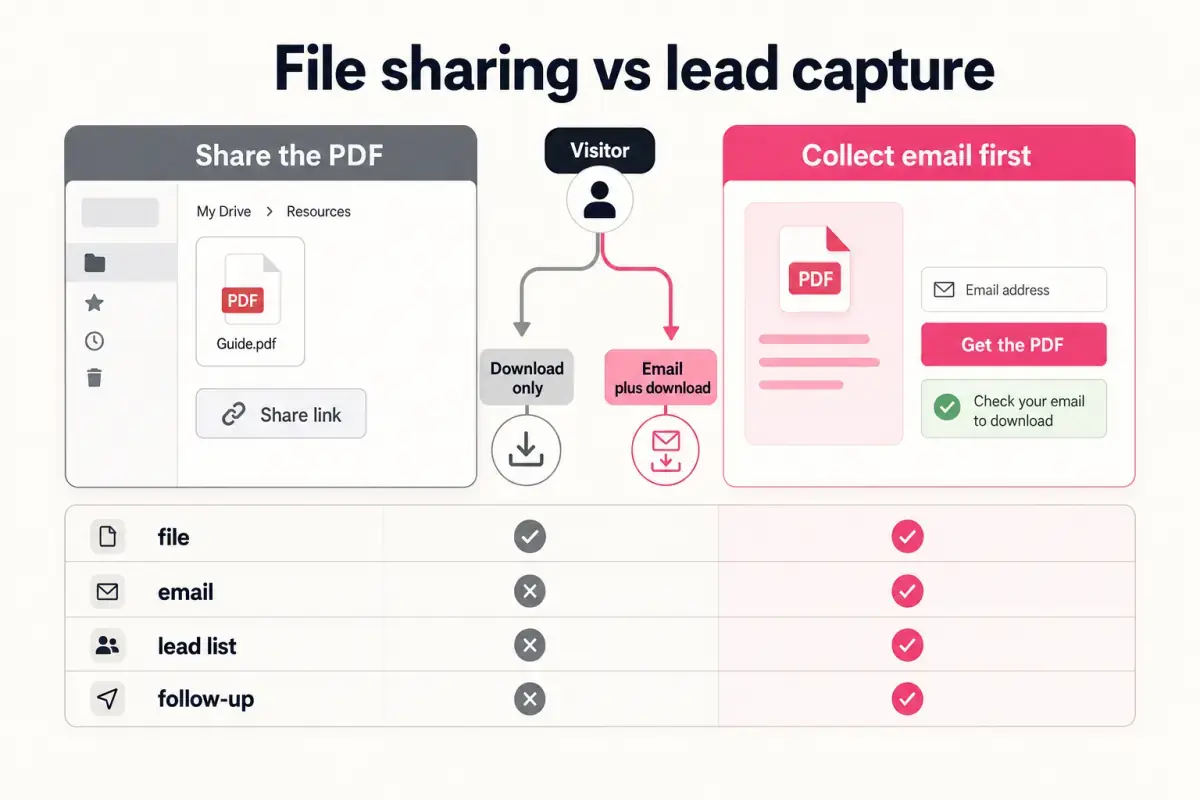
- Givloh is narrower: it hosts a lead magnet page, gates the file behind an email form, delivers the resource, and records the lead.
- For service businesses that only need a free guide, checklist, template, or tool from a social bio link, Givloh is usually the simpler workflow.
Compare the job, not the feature list
Zoho Forms and Givloh can both collect information, but they are built around different jobs. Zoho Forms is a flexible form builder for applications, registrations, feedback, internal workflows, and many other data collection tasks.
Givloh is built for one narrower service-business job: upload a resource, publish a professional page, ask for an email, deliver the file, and save the lead. That focus matters when the traffic source is a social bio link or a local campaign QR code.
If the business needs complex form fields, approvals, or broader workflow automation, a general form builder may be the right fit. If it wants to turn a checklist into a lead capture page quickly, Givloh removes several setup steps.
The practical distinction
- Zoho Forms: flexible data collection and form workflows.
- Givloh: email-gated resource delivery for service business lead magnets.
- Zoho Forms: useful when the form is the product of the workflow.
- Givloh: useful when the resource is the reason someone gives an email.
- Zoho Forms: broader. Givloh: narrower and faster for this specific job.
What the visitor experiences
A lead magnet page needs to explain the resource, reassure the visitor, ask for the minimum useful information, and deliver the file. Too many form fields can make a simple checklist feel like an application process.
With Givloh, the page is centred on the resource. The visitor sees what they will get, enters an email, and receives the file. That is the cleanest path for many service businesses sharing a guide from Instagram, LinkedIn, Facebook, Google Business Profile, or a QR code.
This is the same reason many businesses outgrow public file links, covered in Google Drive vs Givloh for lead magnets.
For a lead magnet, the form should support the resource. It should not become the main event.
Givloh editorial note
Where each option fits
| Need | Better fit | Why |
|---|---|---|
| Collect detailed application information | Zoho Forms | More field and workflow flexibility |
| Offer a free checklist from a bio link | Givloh | Page, gate, file delivery, and lead capture in one flow |
| Run internal request forms | Zoho Forms | Built for broader operational data capture |
| Replace Drive, a form, a landing page, and manual follow-up setup | Givloh | Consolidates the lead magnet workflow |
| Build several service-specific resource pages | Givloh | Each page carries resource context into the lead list |
Decision sequence
- Decide whether the main offer is a file, guide, checklist, template, or tool.
- If yes, choose the simplest page that can explain and deliver that resource.
- Keep the capture form short unless qualification is essential.
- Use the downloaded resource as follow-up context.
- Use a general form builder only when the form needs complex branching or operations.
Why service businesses often choose the narrower system
Most owner-led service businesses are not trying to build a form system. They are trying to capture the people who already show interest in their expertise. The more tools involved, the less likely the setup gets finished.
Givloh is intentionally narrower. It is not trying to replace every form builder. It replaces the common lead magnet stack: Drive for the file, a form for the email, a landing page for the explanation, and a manual place to track the lead.
For the next step, see how to turn a checklist into a lead capture page and how to build a one-resource bio link system.
Choose Givloh when
- The visitor wants a downloadable resource.
- The business wants email capture before file delivery.
- The page needs to look professional without a landing page builder.
- The business wants to know which resource created the lead.
- The setup needs to be done quickly by a small team.
Use this as the starting checklist
- Use Zoho Forms when the form itself needs complex fields, branching, approvals, or operational workflow.
- Use Givloh when the main job is to gate and deliver a lead magnet from a social or local campaign link.
- Keep lead magnet forms short and centred on the resource.
- Use the downloaded resource as the first follow-up context.
- Avoid combining too many tools when the business only needs a resource page and lead capture.
References and useful next reading
Givloh
Turn the resource into a lead capture page.
Upload a guide, checklist, template, or tool. Share one link. Capture the email before the download. No Mailchimp, Zapier, Drive permissions, or landing page builder.
Try Givloh freeFAQ
Is Zoho Forms good for lead magnets?
It can be used for lead capture, especially when a business needs a flexible form. For a simple email-gated PDF, checklist, template, or tool, Givloh is usually more focused.
What is the main difference between Zoho Forms and Givloh?
Zoho Forms is a broad form builder. Givloh is a service-business lead magnet platform that hosts the page, captures the email, delivers the file, and records the lead.
When should a service business choose Givloh instead of a form builder?
Choose Givloh when the visitor is downloading a resource and the business wants a fast, professional page with email-gated delivery and lead tracking.